Bloom Blocks
Place shapes on an 8×8 board and clear full rows and columns. No clock: play until nothing fits.
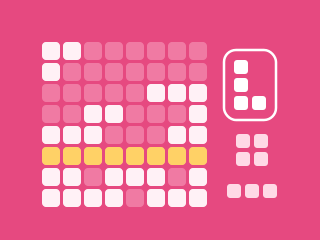
Bloom Blocks
Place and rotate shapes, clear lines to level up, and use Undo or Reroll to keep going. Play until nothing fits.
Try another gamePaused
The clock and scoring are stopped.
Bloom Blocks at a glance
Guide updated
Bloom Blocks is a free block puzzle on an 8×8 board. You place shapes from a tray of three, clear any row or column you fill, and keep going until no shape fits. Shapes can be rotated, and Undo and Reroll help you out of tight spots.
- Type
- Block puzzle
- Players
- 1
- How long
- 5–15 minutes
- Skills
- Spatial planning
- Daily puzzle
- No, play any time
- Controls
- Keyboard, mouse or touch
- Works on
- Phones, tablets and computers in a web browser
- Price
- Free, no download or account
How to play Bloom Blocks
Drag a playable shape from the tray onto the grid and drop it where its outline fits. You can also pick a shape, then hover, focus or touch a dotted square (a valid top-left position) to preview its full footprint and tap to place it. Cells with a glowing gold outline mark a line that the placement would clear. Every block must land on an empty cell. Rotate a selected shape as often as you need. A completed row or column clears and earns bonus points.
When all three shapes are used, a fresh selection appears, with at least one short shape and only shapes that fit at the time they are dealt. If a tray later becomes blocked, you may Undo your previous placement or use a charged Reroll. There is no time limit: the round ends only when no shape fits and no recovery remains.
Controls and round details
Drag a shape onto the board, or select it and tap a dotted top-left square. Rotate as needed; larger L, T, Z, plus and rectangle pieces appear as you progress. After all three offered shapes are placed, three new ones appear. Use keys 1–3 to select a tray shape, R to rotate and U to Undo. There is no clock. The round continues until no move or recovery is available.
Bloom Blocks scoring
Every occupied square in a placed shape earns 5 points. Clearing a completed row or column earns an additional 12 points per cleared square. A four-square placement, for example, earns 20 points before any line-clear bonus. Clearing two or more lines with one placement adds a multi-line bonus. Line totals unlock new levels with a score bonus and a refreshed Undo.
Squares with a small dot are valid top-left placements. Drag a shape over the board, or hover, focus or touch a dotted square, to see all cells the shape will occupy; a glowing gold outline shows the lines it would complete. A shape with nowhere to fit is disabled. Undo restores the board, score, level and available shapes from before the previous placement. You start with one Undo and earn a fresh one on reaching a new level. Two cleared lines charge one Reroll, which replaces all remaining tray shapes once per round.
Bloom Blocks strategy and tips
- Leave long open corridors for the straight shapes.
- Complete both a row and column with one placement for a bigger clear.
- Check all three shapes before filling a corner; rotate a bend when its default orientation does not fit.
- Save Reroll for a tray whose remaining shapes are blocked.
Common Bloom Blocks mistakes
- Filling the centre first. Keep long rows and columns open for straight shapes.
- Placing one shape without checking the other two. Make sure the rest of the tray still has room.
- Forgetting to rotate. Rotation is free and often turns a blocked shape into a line clear.
- Using Reroll while a shape still fits. Save it for a tray that is completely blocked.
About Bloom Blocks
Bloom Blocks is a Tap Rush Arcade original in the popular block-puzzle style, with one difference: shapes can be rotated. Each tray is dealt so that every shape fits when it arrives, and levels bring larger pieces as you clear more lines.
There is no clock, which makes it a calm game for a short break.
Bloom Blocks: questions and answers
Can I rotate shapes?
Yes. Select a shape and tap Rotate or press R. Rotation is free, including when a shape has no valid spot in its current orientation.
What does Undo restore?
It restores the board, score, level, streak and available shapes from before your last placement. You start with one Undo; each new level refreshes it. A personal best already reached is retained.
When can I reroll the tray?
Clear two lines to charge it. Reroll gives three new shapes that fit the current board, and can be used once in the round. It is especially useful when none of your remaining shapes fit.
Is there a time limit?
No. The round ends only when no shape fits and no Undo or Reroll is left.