Minesweeper
Classic Minesweeper with Beginner, Intermediate and Expert boards, plus a daily board that is the same for everyone.
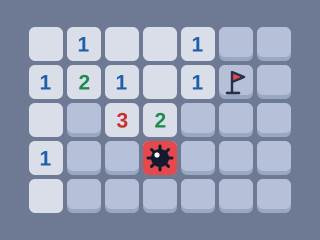
Minesweeper
Reveal every safe square. Numbers show how many mines touch a square. Flag the mines you find; your first click is always safe.
Try another gamePaused
The clock and scoring are stopped.
Minesweeper at a glance
Guide updated
Minesweeper is a single-player logic game played on a grid of hidden squares. Some squares hide mines, and every safe square you reveal shows how many mines touch it. You use those numbers to flag the mines and uncover every safe square without setting one off.
- Type
- Logic puzzle
- Players
- 1
- How long
- About 1 minute on Beginner to 15 minutes on Expert
- Skills
- Deduction, probability, careful attention
- Daily puzzle
- Yes, the same for everyone each day
- Controls
- Keyboard, mouse or touch
- Works on
- Phones, tablets and computers in a web browser
- Price
- Free, no download or account
How to play Minesweeper
Some squares hide mines. Reveal every square that does not. When you reveal a safe square, its number tells you how many of the eight squares around it hold a mine. A blank square has no mines nearby, so the board opens up around it automatically.
Use the numbers to work out where the mines are and mark them with flags. Right-click a square, long-press it on a touch screen, or turn on Flag mode to flag with a tap. When a number already has the right count of flags around it, click the number to reveal all its other neighbours at once. This is called chording and saves a lot of tapping.
On practice boards your first click is always safe, along with the squares around it. The daily board is the same for everyone, so it starts with a safe area already open. Reveal a mine and the round ends.
Boards
- Beginner: 9×9 with 10 mines.
- Intermediate: 16×16 with 40 mines.
- Expert: 30×16 with 99 mines. On a narrow phone screen the board turns upright to 16×30.
- Daily: 16×16 with 40 mines, identical for every player on the same date.
Minesweeper scoring
Every square you reveal scores 1 point. Clearing the board adds a bonus: 100 on Beginner, 400 on Intermediate and the daily, and 1,000 on Expert. On top of that you get 2 points for every second under par: 1 minute on Beginner, 4 minutes on Intermediate and 10 minutes on Expert. The clock starts with your first click or flag.
Minesweeper strategy and tips
- Start with the obvious: a 1 touching only one hidden square means that square is a mine.
- If a number already has all its mines flagged, every other hidden neighbour is safe.
- Look at pairs of numbers side by side. A 1-2-1 pattern along a wall puts mines under both 1s; a 1-2-2-1 puts them under the two 2s.
- Work from the edges of the open area inward, and clear the safe squares before you place more flags.
- If you are truly forced to guess, pick a square that would open the most new information, such as a corner.
Common Minesweeper mistakes
- Clicking fast around unknown squares. Speed comes from reading patterns, not from tapping faster; one wrong reveal ends the board.
- Placing flags you have not proved. A wrong flag makes chording dangerous: tapping a number with a misplaced flag beside it opens a mine.
- Guessing in the busiest area. When a guess really is needed, pick a square that would open the most new information, such as a corner.
- Forgetting the mine counter. Near the end, the number of mines left can settle a final uncertain area.
- Not using chording. Tapping a number that already has the right flags around it clears its other neighbours in one move.
History of Minesweeper
Minesweeper became one of the best-known computer games after Microsoft released its version in the Microsoft Entertainment Pack in 1990 and then included it with Windows 3.1 in 1992. The game was created by Curt Johnson and brought to Windows by Robert Donner, both Microsoft employees at the time.
This version uses the familiar board sizes: Beginner 9×9 with 10 mines, Intermediate 16×16 with 40 and Expert 30×16 with 99. It adds touch-friendly controls, long-press and Flag mode, plus a daily board that is identical for every player and opens with the same safe area, so everyone starts from the same position.
Minesweeper: questions and answers
Is the first click safe?
Yes. On Beginner, Intermediate and Expert the mines are placed after your first click, away from that square and its neighbours. The daily board opens with a safe area already revealed.
How do I flag on a phone?
Long-press a square, or tap Flag mode above the board so every tap places or removes a flag.
What does tapping a number do?
If the number has the matching count of flags around it, tapping it reveals all its other neighbours. If a flag is wrong, you will hit a mine.
Is the daily board the same for everyone?
Yes. The mines are in the same places for every player on the same date, so you can compare times.
Is Minesweeper just luck?
Mostly not. Most boards can be cleared by reasoning from the numbers. Occasionally the numbers leave two equally likely squares, and then a guess cannot be avoided.
What do the numbers mean?
A number shows how many of the eight surrounding squares hide a mine. A blank square has none, so the board opens around it automatically.
When does the clock start?
With your first reveal or flag, so you can study the board first.